Our latest prototype demonstrates how interactive 3D can be used to present a retail showroom display. Below is an overview of the process:
Preparation of the 3D model
We visited a Pottery Barn showroom and used the XGRIDS PortalCam to scan one of their displays. The capture was fast — less than five minutes. As an alternative, a mobile device with an app like Polycam can also be used.
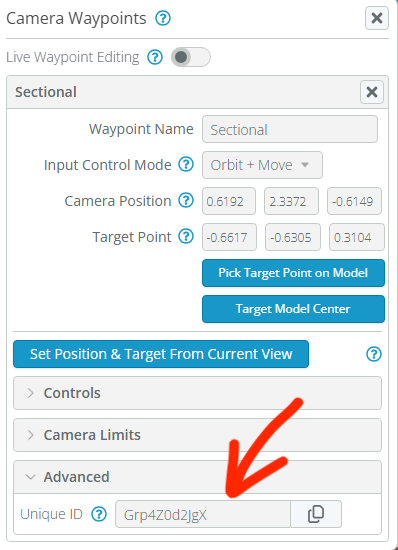
The result is a 3D model in Gaussian Splatting format that requires some light editing. For this step, we used SuperSplat by PlayCanvas. The final file was approximately 60 MB and was uploaded into SeekBeak, an immersive platform where we defined waypoints for each item we wanted to highlight.
Preparation of the database and Intuiface UI
Next, we collected details for each item in the display. This information was gathered from Pottery Barn’s website and organized into a base in the Intuiface Headless CMS.
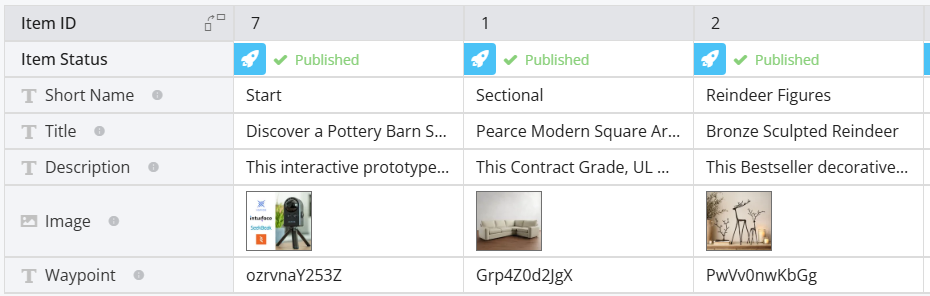
We also added a field to store the ID of each corresponding 3D waypoint in SeekBeak.
In Intuiface, we created a data template containing the item description and photo, and linked it to a carousel collection with a large diameter to enable a smooth left/right scrolling effect as users browse the inventory.
When an item comes into focus, its waypoint ID is sent to the HTML Frame that embeds the SeekBeak scene, using the integration described in this knowledge base article. Upon receiving the waypoint ID, SeekBeak triggers an animation that refocuses the camera on the corresponding location in the 3D scene.
- Try the interactive demo (desktop only)
- Download the Intuiface project file (10MB)
Special thanks to Pottery Barn at Bellevue Square, WA for allowing us to scan their display, to @seb and @louie at Intuiface and Tim Allan at SeekBeak for making this integration possible.