My client is providing me with an Excel spreadsheet that has a list of 80,000 names. They’d like this list to be on a slow crawl on-screen with a search field that will make the list scroll to that name once entered. If anyone has done a searchable list based off of a linked Excel file, I’d like to get some insight on best practices before I “reinvent the wheel”. Any suggestions on achieving this functionality would be greatly appreciated.
Hey there; wondering if you found your answer on this situation yet. If so, it’d be interesting to hear how you did it. I’ve worked with single scene XP’s utilizing 8K+ records, but 80k is a different animal.
Off the top of my head, I would talk to the client about adjusting the scope a bit. A “scroll-to” action on 80k names is likely to cause a problem. My starting point for something like this would be to:
- Use a different database than Excel. (does the data need to be updated? What’s all in each record? Can it be grouped). I use Knack, which could easily handle the data, and I sync it down to our little caching app we built. Then call it locally as an api. This allows any filtering to come through as a ‘response’, and not as a condensing of records like Excel or HCMS, so it’s much lighter load on the cpu/gpu.
- I’d explore grouping and pagination. Can ‘page’s of records be scrolled instead of individual names. Then scroll the pages to try to reduce the per-unit scroll.
- I’d explore ways to visually fake-it. For example, use motion graphics to resemble a blurry cover-flow when the scroll action is initiated, but behind the scenes you are filtering.
- If things were difficult to do it in Intuiface, I’d explore ways to use an external web app to do run the visual effect, and put it into the iframe asset, and talk to @seb about ways to send external commands to the iframe for the scrolling action.
With more context about what this is for, I may have other ideas. But those are the first things I’d explore. Good luck!
3 Likes
Thanks Alex! I really appreciate your suggestions here. The client has a very specific aesthetic choice that is pushing me in a different direction. Mainly that the names cannot appear as a vertical list, but must instead be ordered alphabetically in a “paragraph style” that matches the graphic design of their annual investors report. I’m going to get our developer to see if FlexSearch or MiniSearch will solve the particular set of problems this client is posing. I will keep you posted here.
Awesome, neat to see how you’re moving along on it. I’d love to hear what you learned when the project is done. These are interesting challenges that can help others (including myself). Drop a message and a video so we can see what it looks like!
Hello @AlexB and everyone else,
Here is an example of a way to accomplish @cullenb’s initial request.
Name Search and highlight - Example.zip (12.1 MB)
The way this experience works is by using two copies of the excel names list. One( Names) is used to display that list of names, then the other (Names Search) is used to search for a name via a filter.
The process is this:
- User enters name in the text input asset.
- Search button is pressed, which does an add filter action on the Names Search excel. Then a simulate a tap action on the Go To button.
- The Go To button does an update cell action on the Names Excel. The row number is bound to the first item in the Names Search Excel, which should be filtered which will give you the ID/Row of the name.
The reason for the value change to TRUE is to check the Toggle button “highlighting” the name - Then a scroll to an index action is done with the Asset Grid, the Index value is also bound to the first item of the Names Search excel.
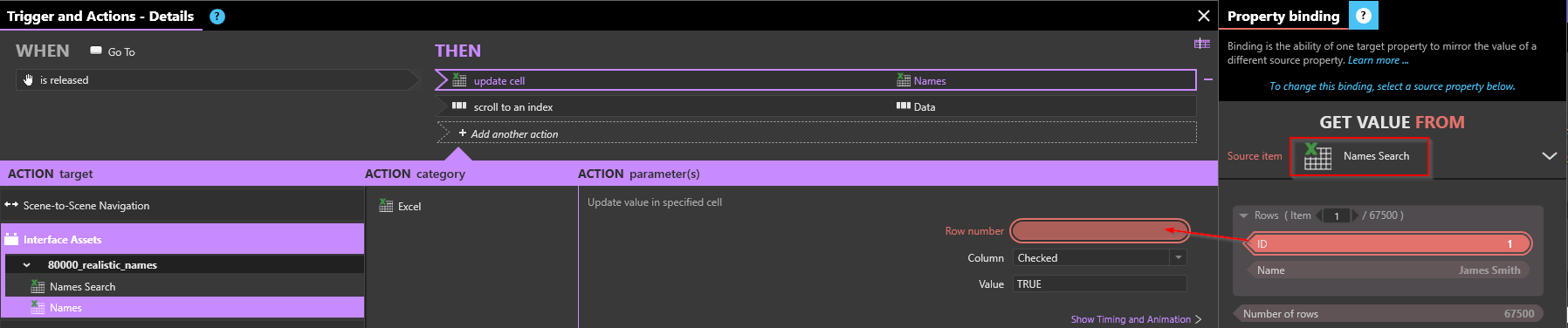
Some things to note:
- The toggle buttons are part of a toggle set to ensure only a single one can be active. There is also an additional Toggle button outside of the view of the scene which is part of the toggle set, this is used to make sure all toggle values are set to False when the experience starts.
- Given the amount of rows in the Excel, the initial load time of the experience is long, I included a “Loading” layer that will hide after 2 minutes, which was enough time on my PC, but your results might vary.
If you have any questions don’t hesitate to ask.
-Ryan